MBG Dashboard
Open-source kitchen ops dashboard for SPPG units running Indonesia's Makan Bergizi Gratis program. Tauri 2 desktop + PWA from a single React codebase, offline-first, 31 screens, 17 entities, 10 government compliance mandates encoded as hard constants.
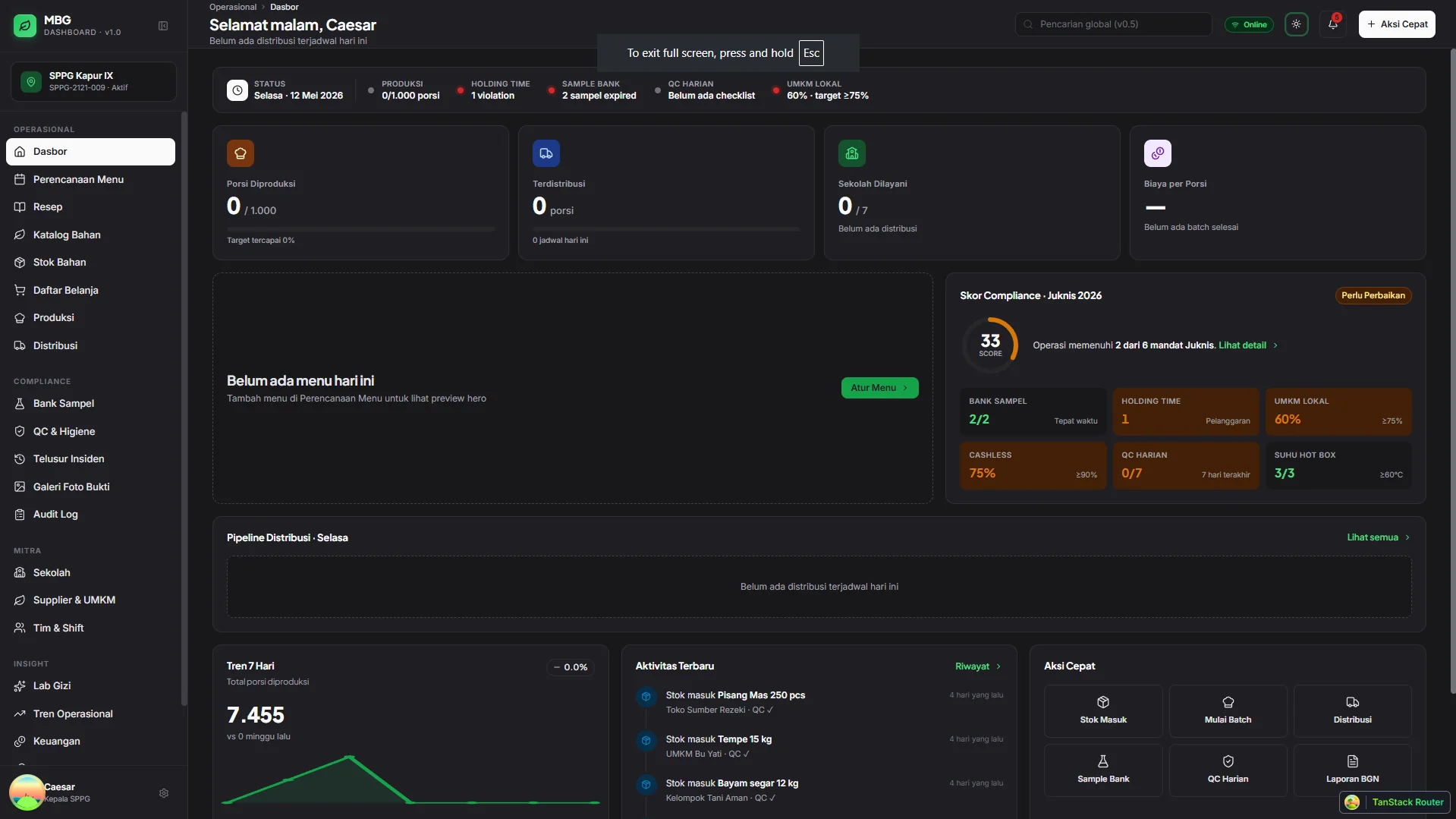
Honesty note
MBG Dashboard is at v0.1.0 — first production release, signed and shipping. The "Visit live demo" button opens the release distribution site hosting the 6.77 MB signed Windows installer and Tauri auto-update feed; the install flow is verified end to end (download → install → boot → trial). The fourteen-day trial unlocks the full thirty-one screens; after that, the app drops to read-only rather than locking your data. Source stays private through pilot, goes public under MIT on the August 1, 2026 launch. Real SPPG kitchen deployment hasn't happened yet — judge the architecture and the craft, not field-tested numbers that don't exist.
- 31 Screens wired
- 17 Domain entities
- 10 Compliance mandates
- 2 Runtime targets
- MIT Source license
- v0.1.0 Production release
The brief.
Makan Bergizi Gratis (MBG) is Indonesia's national free school meals program. It rolled out at scale in 2025 and is operated through tens of thousands of local SPPG kitchen units — Satuan Pelayanan Pemenuhan Gizi — each cooking and distributing meals to schools in their service area. Most run on spreadsheets, WhatsApp, and paper. The work is real and life-feeding; the tooling is not.
MBG Dashboard is the single-operator tool for the Kepala SPPG — fifteen modules covering menu planning, the recipe builder, FEFO inventory, HACCP production gates, distribution to schools, sample bank, traceability, school and supplier partners, staff and shift management, lab gizi, finance, BGN reports, and the photo evidence gallery. Thirty-one routes, seventeen domain entities, ten Juknis MBG 2026 compliance mandates encoded as hard constants. All of it live in v0.1.0, signed, and shipping today.
The same app installs as a desktop binary (Windows, macOS, Linux) or runs as a web app — install once, work either way. The database lives on the device, so the kitchen keeps moving even when the internet doesn't. The architecture matches the deployment reality (flaky internet, shared commodity laptops) instead of fighting it.
Distribution is hybrid. Source is MIT — fork, compile, self-host, no permission needed. The signed binary is commercially licensed (annual or lifetime), runs a fourteen-day trial, then drops to read-only mode instead of locking the data. No SaaS subscription, no per-seat fee, no cloud dependency. Constraint as positioning — every dependency justifies itself, every hardcoded threshold is auditable against the published Juknis.
The stack.
Runtime Targets
- Tauri 2 desktop binary (Windows, macOS, Linux)
- Progressive Web App
- Same product installs either way
UI Layer
- React 19 + TypeScript
- Tailwind v4
- TanStack Router
- Plus Jakarta Sans · Inter · JetBrains Mono
Data & Persistence
- Drizzle ORM
- SQLite on desktop
- Dexie + IndexedDB on web
- Migrations embedded in the installer
State & Forms
- TanStack Query
- Zustand
- React Hook Form + Zod
Tooling
- Vite · pnpm · Biome
- Vitest + Testing Library
- TypeScript strict
Domain Constants
- Juknis MBG 2026 thresholds
- TKPI ingredient master
- Permenkes 28/2019 AKG (7 age groups)
- HACCP CCP-3 cook-temp gates
What it does.
-
Menu planning calendar
Functional weekly view with prev/next/today and ISO 8601 week numbers. Click an empty day to create a daily menu pre-filled with the date, click a filled menu to edit. Color-per-recipe via deterministic hash so the same recipe always reads as the same color across the week.
-
Recipe builder + recipe scaler
Full-page editor, not a modal — the complexity earns it. TKPI ingredient picker, auto-calculated nutrition + cost + AKG percentage in real time, sticky preview of totals against the target age group. Recipe scaler modal in the quick-tools drawer recalculates the BOM to any target portion count and re-quotes the cost.
-
Inventory FEFO + bulk operations
First-expired-first-out picking with per-batch tracking, expiry warnings, and stock movement history. Multi-select with a floating bulk action bar for stock writes — receive, adjust, discard a dozen lines without leaving the table.
-
Production batch with HACCP gates
Cook-core temperature gate at ≥75°C (HACCP CCP-3), holding-time state machine that walks safe → warning at 1h-remaining → critical at 30min → expired (blocks distribution). Photo-bukti required at batch complete and distribution checkpoints.
-
Sixty-second traceability + sample bank
Bank Sampel held ≥24 hours per Juknis 2026 with countdown chips per sample. Full incident traceability — supplier → ingredient batch → production → distribution → eight schools — required to resolve in under 60 seconds. Picker mode opens directly from any incident or batch.
-
Compliance dashboard + Tren Operasional analytics
Ten compliance rules compute in real time as the day's data lands — UMKM ratio, cashless ratio, hot-box temperature, AKG, protein variety, incident SLA. Tren Operasional view layers four longitudinal SVG charts on top: cost-per-portion weekly, daily production volume, on-time delivery, top expense category.
-
Photo evidence pipeline
Compliance demands a photo at every checkpoint — ingredient receipt QC, batch complete, distribution handoff, sample bank, daily QC. On desktop, photos live on the device filesystem rather than in the database, so the data store stays light and the gallery stays scrollable even after a few thousand captures.
-
Audit-ready outputs + offline reports
PDF Laporan Insiden BGN with severity badge, RCA, corrective/preventive actions, signature block. Daily, weekly, monthly PDF reports plus Excel multi-sheet workbooks. Everything generates on the kitchen's own device — no server round trip, fully offline.
-
Tauri desktop polish
Signed auto-updater with a persistent banner and a manual check in Settings. Daily backup writes a rotating snapshot of the full dataset to local app storage, so a corrupted day never costs more than the day. Global command palette for navigation, dark mode, and a five-step onboarding tour on first launch.
-
License activation + read-only enforcement
Ed25519-signed license tokens activate the binary locally — no internet phone-home, no telemetry, no cloud check. Fourteen-day trial, then the app drops to read-only mode without nag screens, deleted data, or surprise lockouts. Read-only enforcement guards write paths at four layers so the constraint holds even if a fork compiles from source and tries to route around it.
In motion.
Captures from the Tauri desktop build, seeded with the bundled demo dataset (1 SPPG · 8 schools · 7 suppliers · 12 TKPI ingredients · 5 recipes). The hero shot above and these three together cover the screens that carry the most of the product narrative.
-
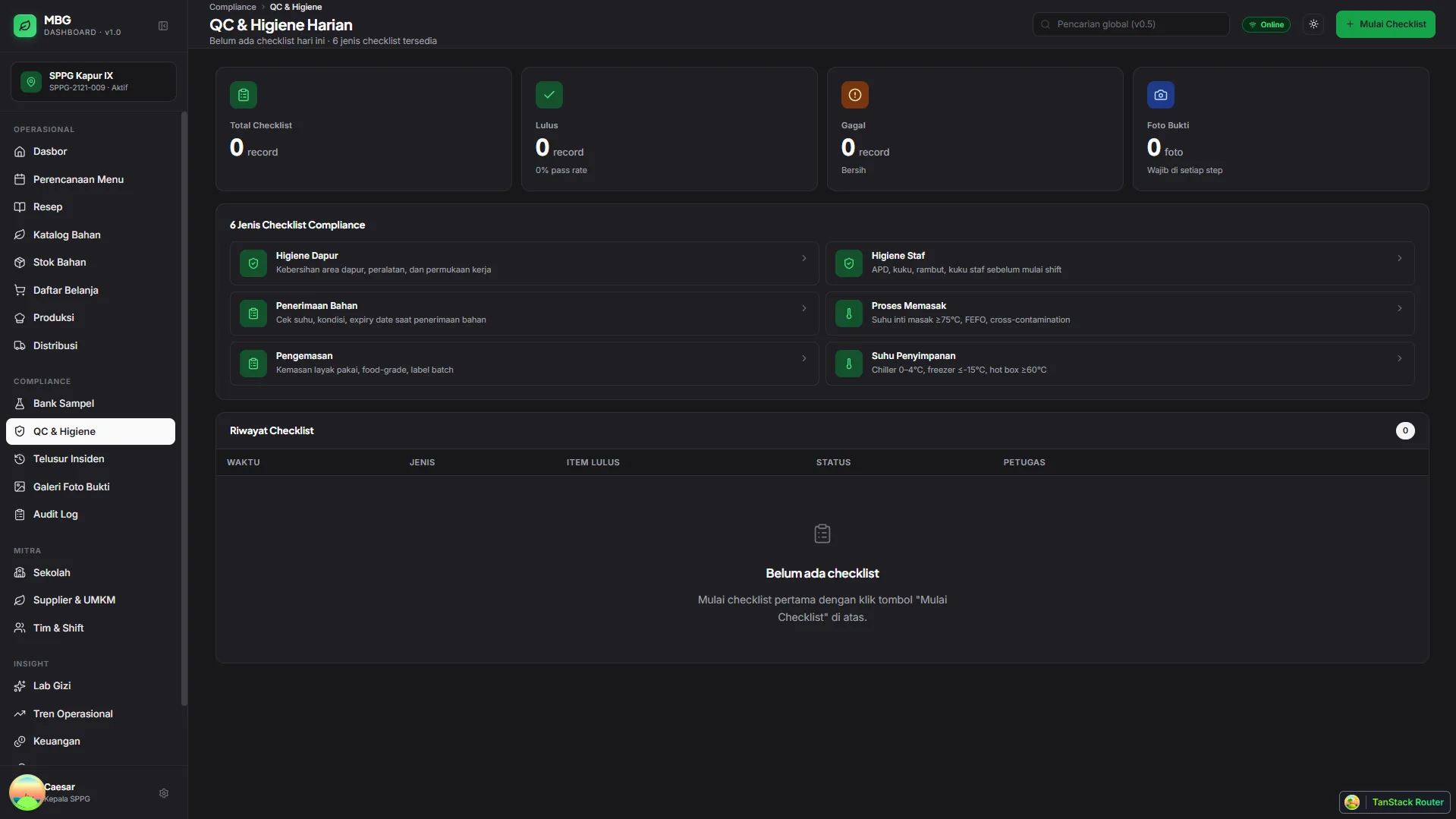
02 Traceability — supplier → lot → batch → eight schools in one query
-
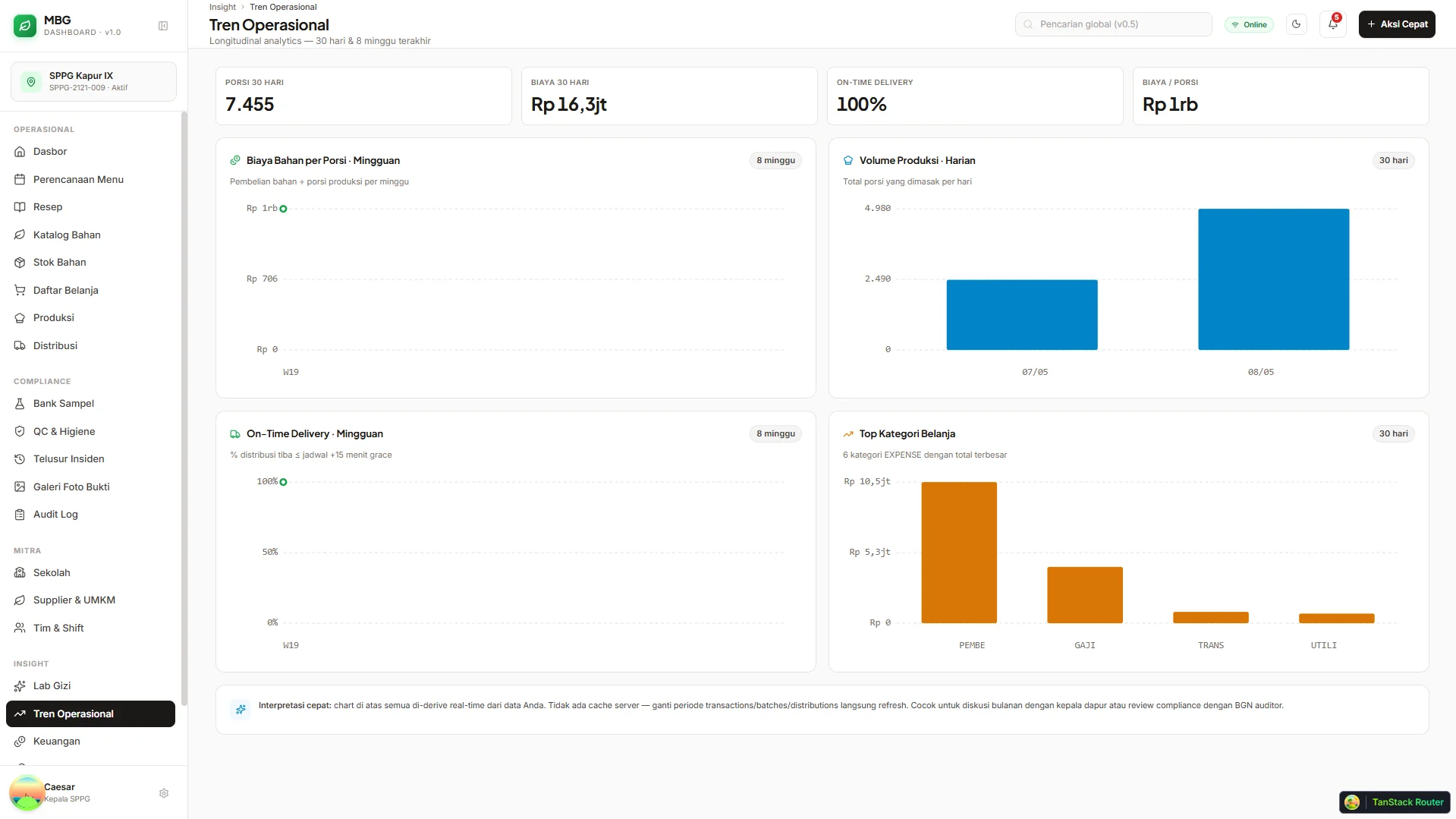
03 Tren Operasional — four longitudinal charts, pure SVG, zero charting lib
-
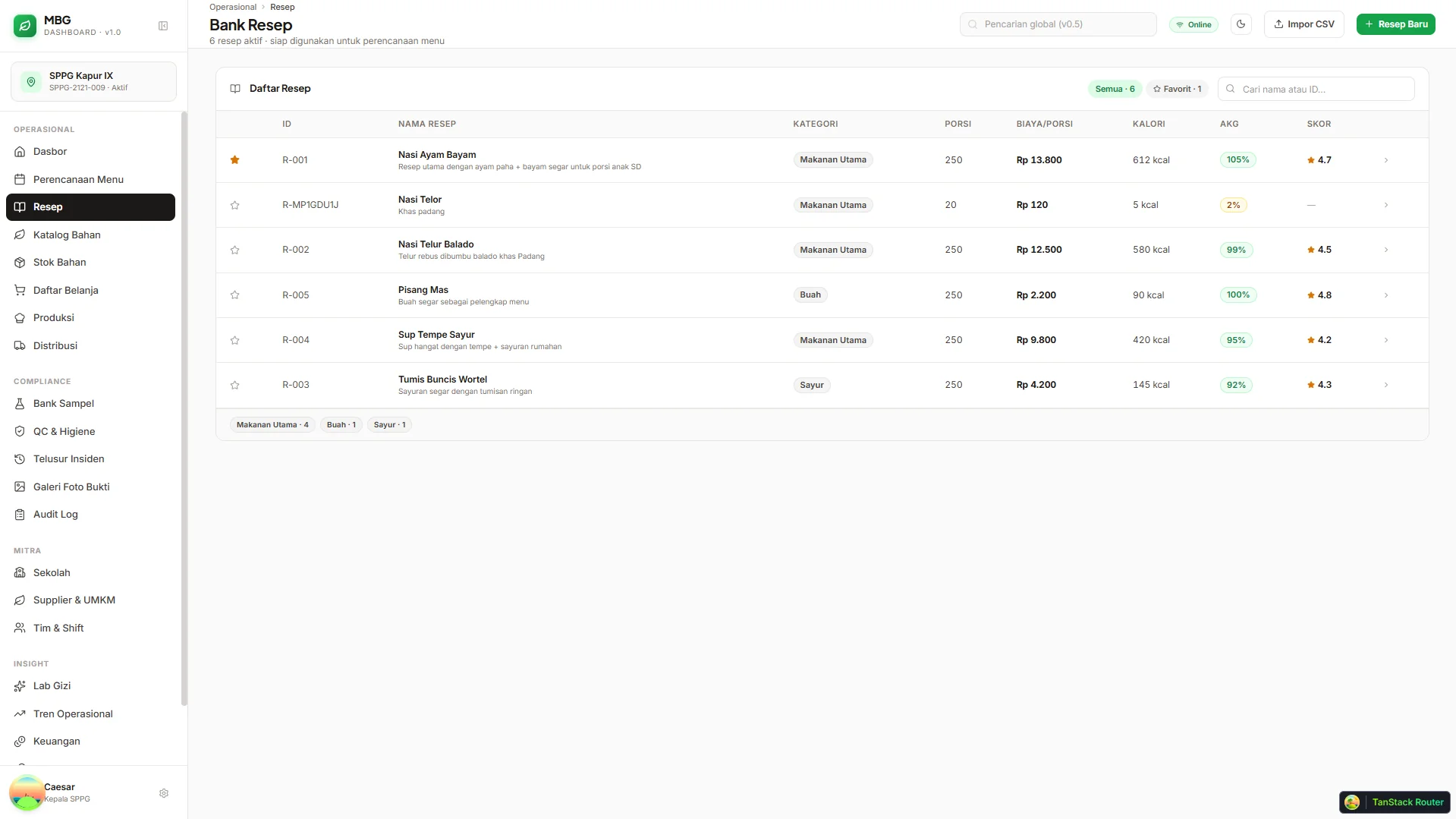
04 Recipe Builder — TKPI picker, real-time AKG and cost-per-portion
Architecture decisions.
-
One product, two install paths
Same app installs as a desktop binary (Windows, macOS, Linux) or runs as a web app — install once, work either way, no separate codebases to maintain. A kitchen with a shared Windows laptop runs the desktop binary; a supervisor checking from a tablet uses the PWA. The data and the workflow stay identical.
-
Compliance baked into the workflow
All ten Juknis MBG 2026 thresholds — sample hold hours, holding-time max, cook-core temp, UMKM ratio, cashless ratio, hot-box temp on arrival, AKG, protein variety, incident reporting SLA, traceability time — live as a single source of truth. The compliance dashboard reads them; every mandate UI computes against the same numbers. They never relax without a documented review.
-
Offline-first because the deployment demands it
SPPG kitchens run on flaky internet and shared commodity laptops. The database lives on the device — SQLite on desktop, IndexedDB on web. There is no remote authority to reconcile with. Reports export locally. The architecture matches the deployment reality instead of fighting it.
-
Bahasa Indonesia as a first-class language, not a localization layer
Native domain naming end to end — Kepala SPPG, Bank Sampel, Bahan Baku — not Manager, Sample Bank, Raw Material. Indonesian number formatting (Rp 14.000 with titik thousand separator, 1,5 kg with decimal koma), Indonesian date formatting (7 Mei 2026), and a professional asisten voice (Hapus resep ini permanen? not Apakah Anda yakin?). No emoji decoration, no cheerleader copy.
-
Compliance is design surface, not a checkbox
Every threshold has a UI consequence. Holding-time chips change color and block the distribute button at expired. UMKM ratio gates a chart segment. Sample-bank countdown lives next to every sample. The ten rules are the KPIs the operator looks at all day, not settings buried three menus deep.
-
Hybrid distribution: MIT source, commercial binary
Two paths to the same product. Source code is MIT — any SPPG (or developer at one) can fork the repo, compile, and self-host for free. The signed binary Caesar ships is commercially licensed (annual or lifetime tier), runs a fourteen-day trial then drops to read-only mode. The two models reinforce each other: the technical path is fork-and-compile, the convenience path is download-and-pay, and either way the kitchen owns its data on the kitchen's own device. No SaaS subscription, no per-seat fee, no cloud dependency.
What I'm learning.
-
Tight scope moved the ship date months earlier
v1.0 assumes one user — the Kepala SPPG. Cutting roles, permissions, and multi-tenant complexity shed an entire dimension of work (auth flows, tenant isolation, audit of the audit) and freed that time for compliance depth and production polish.
-
Tauri wins on disk and trust
Tauri uses the platform's native webview — no bundled Chromium, no Electron tax. MBG Dashboard's signed Windows installer comes in at 6.77 MB. SPPG laptops are commodity Windows machines with limited disk; a small, auditable binary is the right shape for a tool that has to run on whatever's already there.
-
Late-stage polish is its own design phase
A late-stage UI audit caught twenty-six concrete usability gaps — chart labels overlapping at narrow widths, table action columns collapsing on tablets, progress bars overflowing on edge data. A spec gets you to feature-complete. Polish is what gets you to launchable.
-
Auto-updater changes the velocity model
A signed auto-updater means desktop fixes ship at web speed — push to the release feed, every kitchen running yesterday's build picks it up tonight. Once that loop is in place, the size of a release stops driving the schedule. Smaller, more frequent ships start to feel safer than big batched ones.
Try v0.1.0.
Production release available now. Download the 6.77 MB signed installer, run the fourteen-day trial, walk the full thirty-one screens. Source goes public MIT on the August 1, 2026 pilot launch. Freelance and full-time inquiries open for SaaS, AI integration, and offline-first desktop + web work.