Channelflow
Internal AI operations platform for a Bali restaurant group. Omnichannel inbox unifying WhatsApp and Instagram, multi-tier AI pipeline with human override, full audit trail on every AI decision — built and delivered solo.
Honesty note
Channelflow is deployed and running in production for a Bali-based restaurant group. The client's name is omitted at their request — the platform handles real customer messages and bookings. The architecture, technical decisions, and feature set documented here are accurate. Source code is open on GitHub under the Channelflow name.
- 6 Dashboard modules
- 2 Channels (WA + IG)
- 3 Staff roles
- 4 AI pipeline stages
- 8 Agent tools
- 5 Routing categories
The brief.
A restaurant group in Bali was fielding hundreds of customer messages daily across WhatsApp and Instagram — booking requests, menu questions, influencer pitches, complaints. They had AI workflows handling replies, but no visibility into why the AI made specific decisions, no way to intervene when it went wrong, and no structured path when a conversation needed a human.
The brief was clear: build an internal AI operations platform — not a chatbot. A system where staff can monitor every AI-handled conversation in real time, take over the moment something looks wrong, and trace back any AI decision after the fact.
The result is Channelflow: a six-module omnichannel dashboard that ingests WhatsApp and Instagram DM and comment threads into a single unified inbox. A multi-tier AI pipeline handles classification, guardrail enforcement, and reply generation — handing off to humans immediately when any step detects risk. Every decision logged, every escalation traceable, every reply editable.
The stack.
Frontend
- Next.js 16 (App Router)
- TypeScript 6
- Tailwind v4
- Inter + JetBrains Mono
Backend
- Hono.js v4 (Node.js 24)
- PostgreSQL 17
- Drizzle ORM 0.31
- jose (JWT)
Realtime & Queue
- Socket.io v4
- BullMQ v5
- Redis 7 (AOF persistence)
AI & Messaging
- Mastra v1 agent framework
- OpenRouter (multi-model routing)
- YCloud (WhatsApp Business API)
- Meta Graph API (Instagram DM + comments)
Deploy
- Coolify v4 (self-hosted PaaS)
- Docker Compose
- GitHub auto-deploy
- Let's Encrypt SSL
The six modules.
-
Centralized Inbox
Three-pane layout: conversation list on the left, message thread in the center, AI suggestions and contact details on the right. WhatsApp and Instagram DM and comment threads land in the same place. AI messages are visually distinct from human replies at a glance. Staff see the AI's suggested next response — with source attribution and confidence — before deciding whether to use it, edit it, or take over entirely.
-
Booking Management
Day timeline view showing all reservations — whether the AI collected them from a chat conversation or staff created them manually. Conflict detection with inline resolution. Each booking block links directly to its originating conversation, so the full context is one click away. Week and list views for broader planning.
-
Analytics Dashboard
Response time trends, AI deflection rate, per-channel message volume, and late-reply breakdowns. Four KPI tiles compare current period against prior period with delta indicators. Headline chart breaks down who replied — AI vs. human — and when late replies occurred. Designed for non-technical managers: plain-language labels, no SLA jargon.
-
Outbound Messaging
Campaign composer for WhatsApp and Instagram outreach. Four-step wizard: pick channels, pick targets, compose, review. Supports WhatsApp Business pre-approved message templates with personalization variables. Per-recipient delivery status. Deep-link from each campaign recipient back to their inbox conversation.
-
AI Agent Configuration
Master on/off toggle that pauses AI across all conversations immediately. Knowledge base with file upload and URL import, with ready/indexing/failed status per article. Booking rules (party size limits, opening hours per weekday, blackout dates). Confidence threshold slider, tone settings, supported languages. A sandbox playground lets staff test the AI's behavior before activating it globally.
-
Channel Connections
Connect and manage WhatsApp Business and Instagram Business accounts. Per-channel health monitoring — healthy, warning, disconnected, paused — with inline reason display when something goes wrong. Volume stats and last-sync timestamps per channel. Team management with role-based channel scope: scoped members only see conversations from their assigned channels.
In motion.
Four of the six dashboard modules — the daily workhorses for the ops team.
-
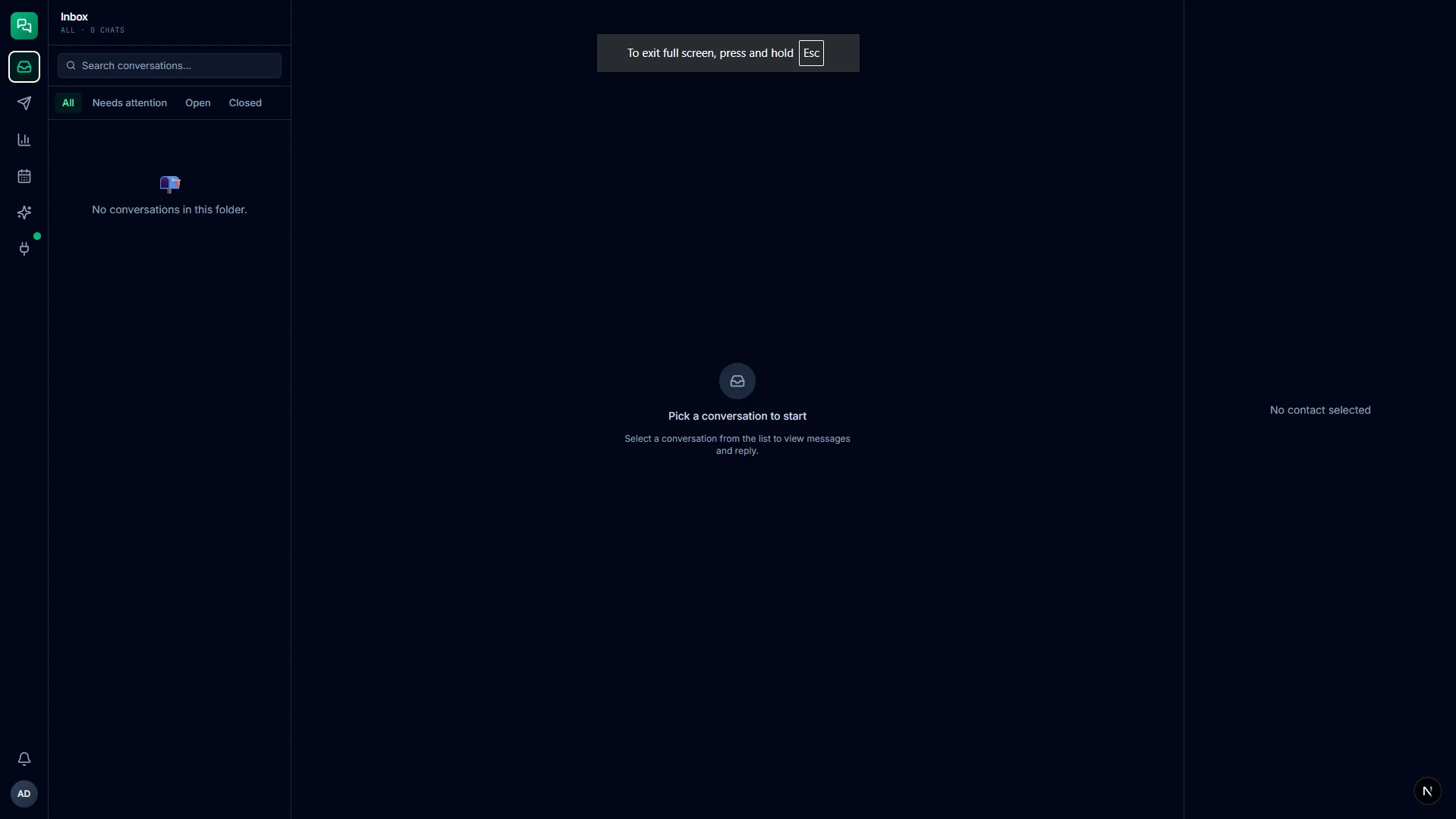
01 Inbox — omnichannel thread view, AI suggestions, one-click takeover
-
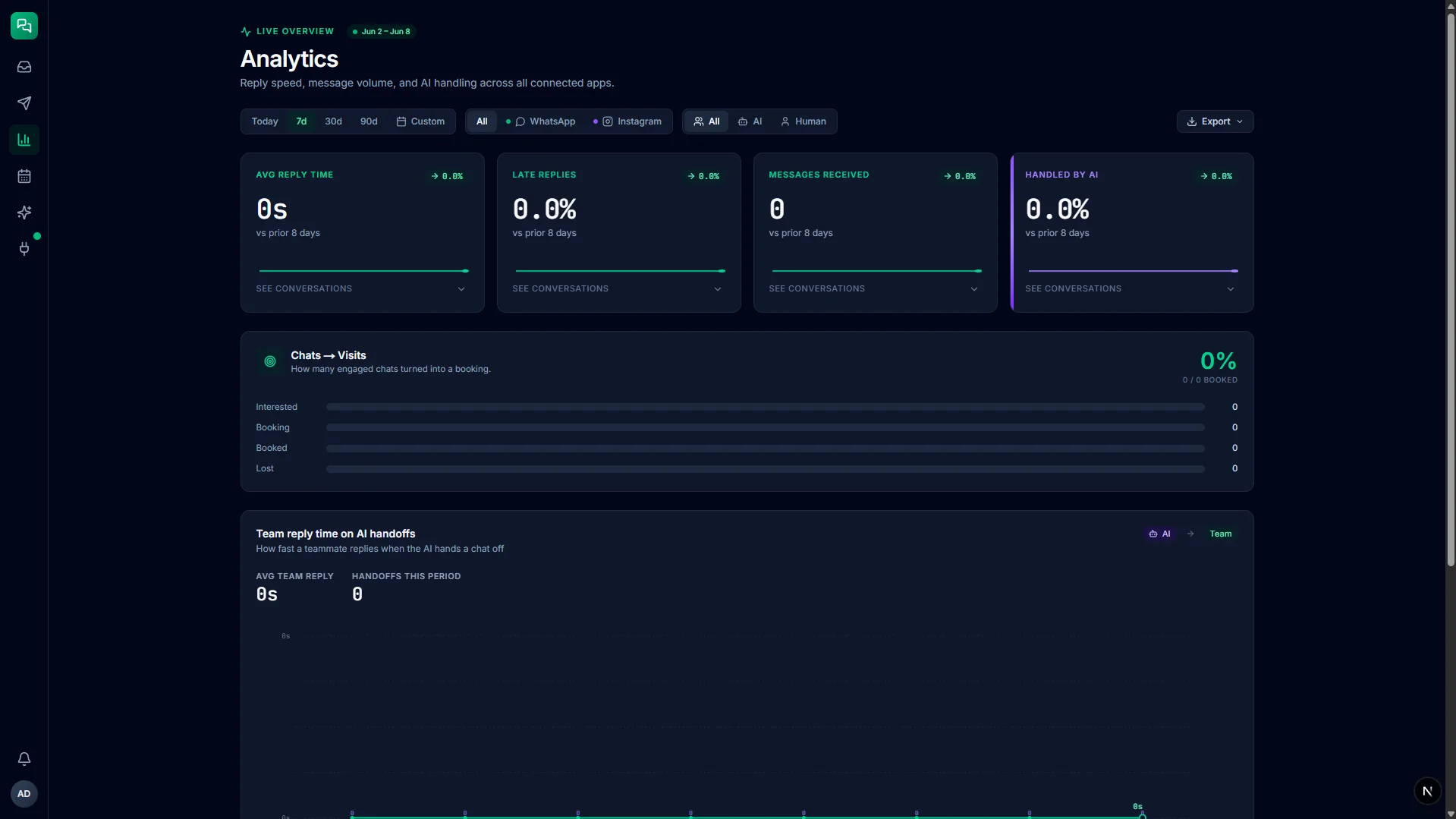
02 Analytics — KPI tiles, AI deflection rate, reply-time trends
-
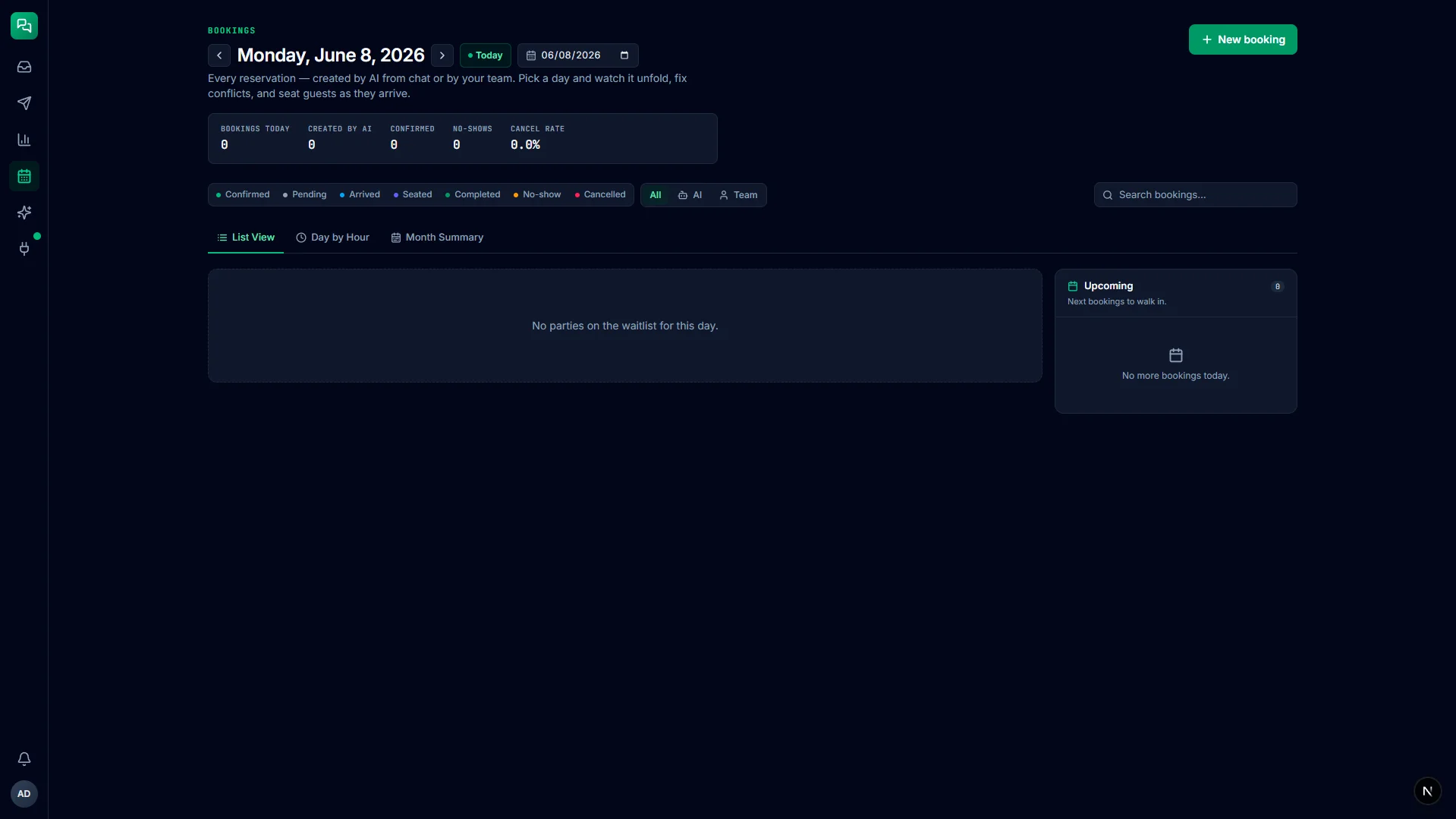
03 Bookings — day timeline, conflict detection, deep-link to source conversation
-
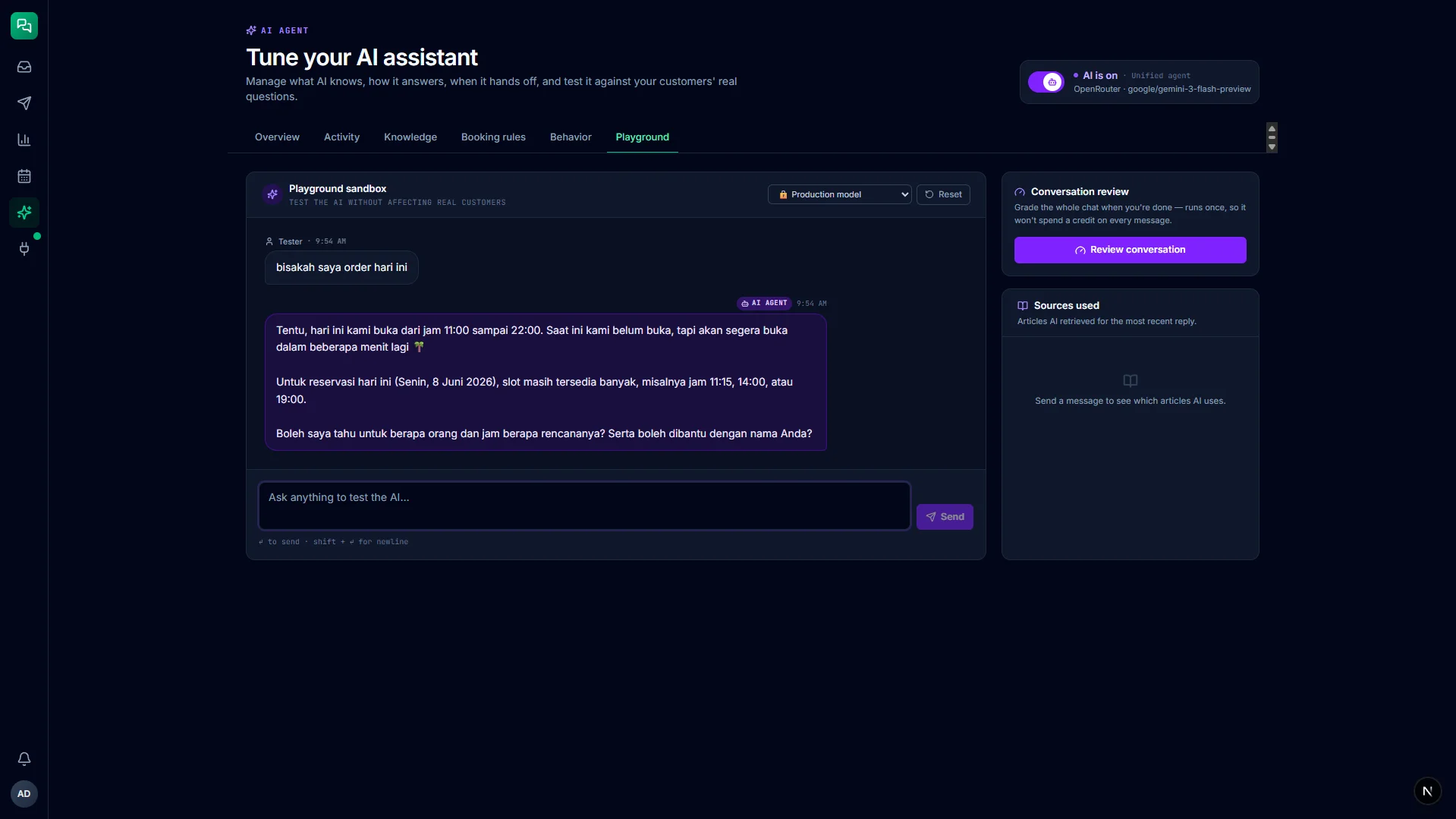
04 AI Agent — knowledge base, booking rules, confidence controls, sandbox playground
Architecture decisions.
-
Webhook isolation keeps messaging reliable
Hono.js runs as a separate process from the Next.js dashboard. The webhook handler receives a message, writes it to the database, and acknowledges to the provider in under 500ms — then hands the job to BullMQ. The AI processing loop never touches the webhook path, so a slow AI response or a dashboard deploy never causes a missed message.
-
BullMQ for zero message loss
Each inbound message is enqueued to Redis before the webhook returns 200. If the server restarts mid-processing, the job survives and resumes. Built-in retry with exponential backoff handles transient AI model errors without manual intervention. A dead-letter queue catches jobs that exhaust retries so they can be replayed from the dashboard.
-
Multi-tier AI pipeline — right model for each job
Not every message needs the expensive reasoning model. A fast, lightweight classifier runs first and returns a category and confidence score in roughly 200–300ms. Only messages that pass the guardrail check and meet the confidence threshold reach the full reply writer. This keeps cost proportional to complexity and keeps latency low for simple FAQ responses.
-
Mastra for orchestration and observability
Mastra acts as the AI conductor — it handles memory per contact, registers agent tools, manages the generate loop, and provides built-in input processors for prompt injection detection. Critically, its observability output feeds directly into the dashboard's AI Agent section, so the audit trail is a product feature rather than a developer debug log.
-
Guardrails embedded in instruction, not a keyword table
High-risk category rules — influencer collaboration requests, complaints, partnership pitches — are written in natural language directly in the agent instruction and enforced semantically by Mastra's input processors. A keyword table would let a rephrased request slip through; semantic enforcement catches the intent. Rules are updated in code, not from a dashboard form, which is intentional: these are core business constraints, not settings.
-
Self-hosted removes per-message billing risk
The client operates a VPS. Running on Coolify with Docker Compose means the entire stack — backend, frontend, database, queue, cache — lives on infrastructure the client controls. No per-message or per-seat SaaS billing on the platform layer itself. SSL via Let's Encrypt, auto-deploy from GitHub, health checks built into the Compose file.
What I'd do differently.
-
Separation of concerns pays off at deploy time
Isolating the webhook handler from the dashboard means each layer deploys and restarts independently. A dashboard redeploy never risks a webhook timeout window. This seems obvious in theory; shipping it as two separate containers made it a real constraint rather than a principle.
-
Confidence scores beat hard routing rules
The classifier's confidence output is more actionable than any keyword-based routing table. When confidence drops below threshold, the message routes to human — no edge-case maintenance. The circuit breaker makes the degradation path explicit: if the classifier goes down, everything routes to human until it recovers.
-
The audit trail is a feature, not a log
Logging every AI decision with its reasoning, model, category, and duration turned the agent_logs table into a product surface. Staff can look up why the AI said something specific, days after the fact. That visibility is what makes the system feel trustworthy rather than like a black box.
-
Human handoff design matters more than AI accuracy
The most important UX decision wasn't how good the AI replies are — it was how clearly the handoff is communicated and how fast a human can take over. The amber banner, the one-click takeover, and the 'Return to Agent' path collectively define whether staff trust the system enough to use it.
Building something like this?
Channelflow is the pattern for AI-native internal tooling — multi-model pipeline, full staff oversight, auditable decisions, real delivery. If you need the same level of transparency and control in an operations platform, I'm available for full-time and freelance engineering.