Career OS
A fully offline desktop app for tracking a job search and freelance leads. No server, no account, no cloud sync — one local database, two independent pipelines, built for daily real use.
Honesty note
Career OS is in daily real use — my own job search and freelance outreach run through it. Source is currently private. Every screenshot on this page is captured directly from the live app, seeded with real working data, not a mockup.
- 2 Independent pipelines
- 3 Views per pipeline
- 7.6 MB Installer size
- 0 Servers or accounts
- Go Backend language
- Solo Built and maintained by
The brief.
I was tracking job applications in a spreadsheet — company, position, status, dates, notes. It worked, barely: no relational structure for multiple interview rounds per application, no pipeline view, no computed insights for what's overdue or needs a follow-up, and nothing to stop a typo in a status column.
Career OS replaced it with a fully offline desktop app — one local database, no server, no account, no cloud sync. Table, Kanban, and Dashboard views cover the job-application pipeline end to end, from first application through interview rounds to an offer or a rejection.
A second pipeline grew alongside it once the first was stable: freelance lead tracking, for cold outreach to potential clients. Structurally similar to the job pipeline, but modeling an inverted relationship — so it stayed its own domain rather than getting folded into a shared one.
The stack.
Desktop Shell
- Wails
- Native Go binary — no Electron, no bundled Chromium
- Windows installer
Backend
- Go
- SQLite via a pure-Go driver — no C toolchain dependency
- Type-safe generated query layer
- Schema migrations embedded in the binary, auto-run on startup with a pre-migration backup
Frontend
- React + TypeScript
- Vite
- Tailwind CSS
- Accessible unstyled component primitives
State & Data Flow
- Query caching with invalidation-driven refetch after every write
- A UI-only state store for layout, filters, and theme
- No REST layer — the frontend calls Go methods directly as async functions
Feature Libraries
- Windowed table virtualization for thousands of rows
- Drag-and-drop Kanban board
- Dashboard charts
- Autocomplete drawn from historical data already in memory
Distribution
- Windows installer, ~7.6 MB
- Static landing page with direct download + checksum
- Version manifest in place for a future auto-updater
What it does.
-
Two pipelines, one shell
Job application tracking and freelance lead tracking live side by side, each with its own six-stage pipeline, table view, Kanban board, and dashboard — sharing one app shell but modeled as fully independent domains.
-
Table view with inline quick-add
Sortable, filterable rows with an inline quick-add row instead of a modal — Tab to move between fields, Enter to submit. Autocomplete on repeated fields like company name and source platform, aging badges, and overdue indicators.
-
Kanban board
Drag-and-drop cards across pipeline-stage columns. Each column scrolls independently instead of growing the whole page. Terminal-status columns — Rejected, Withdrawn, Won, Lost — hide by default behind an "active only" toggle.
-
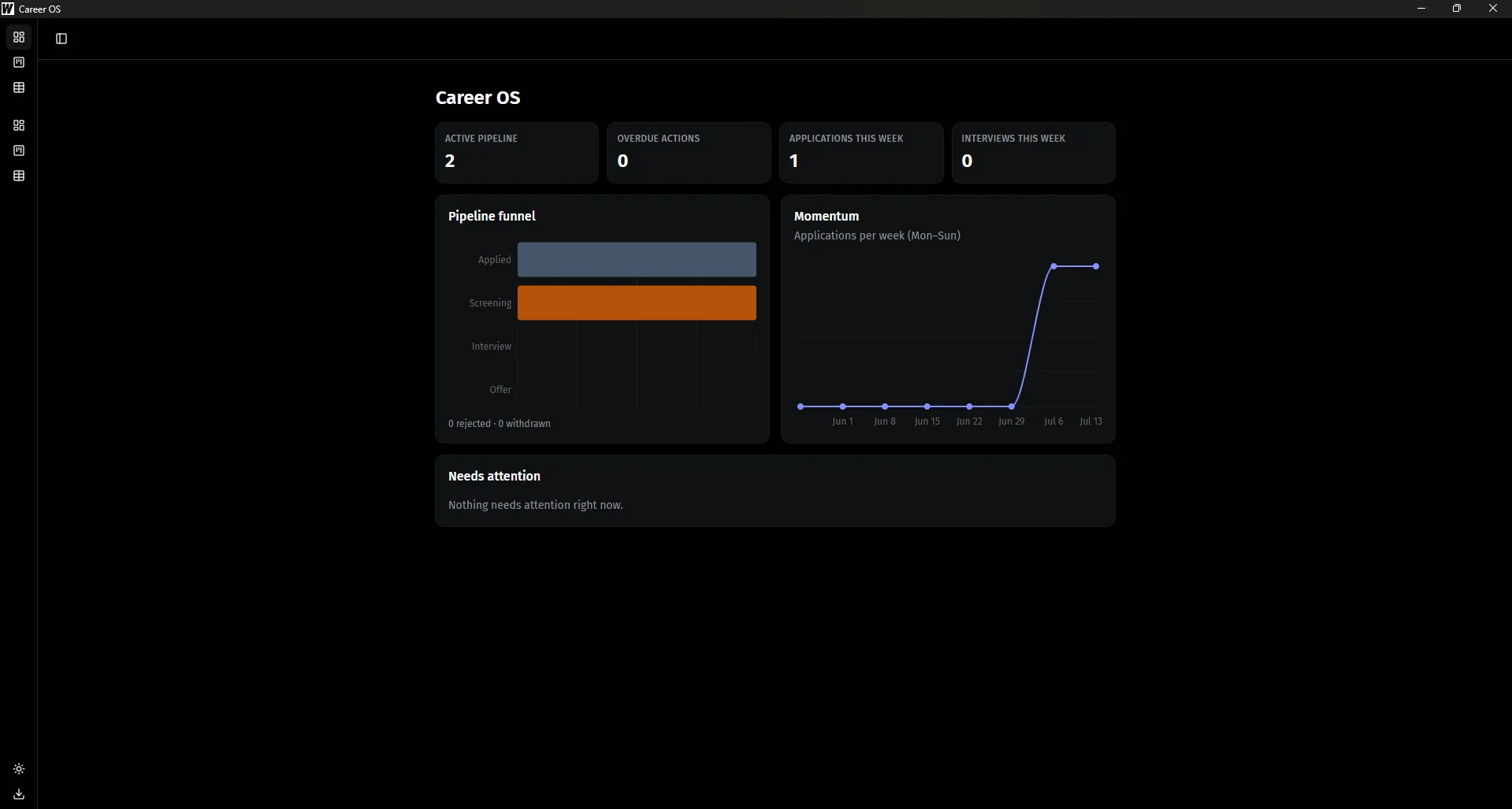
Dashboard
The default view on launch. KPI cards, a pipeline funnel chart, an eight-week momentum line chart, and a "needs attention" list that merges overdue follow-ups with upcoming interview rounds, sorted automatically.
-
Interview rounds
Each job application can carry its own set of interview rounds — screening, technical, take-home, final, and anything in between — cascade-deleted along with the parent application.
-
Bulk CSV import for leads
Leads sourced externally — from cold outreach or map-based prospecting — import in bulk instead of one at a time.
-
CSV export
One click generates both applications and interview-round CSVs through a native file-picker dialog, with correct escaping by construction.
-
Status-color system
Each pipeline status gets a fixed, theme-stable color — badge in the table, chip and ring in the Kanban card, banner in the column header — so status reads instantly across every view.
-
Light and dark themes
Both treated as first-class, not a dark mode bolted onto a light-only design. Defaults to the OS preference, persists once picked manually.
In motion.
Everything described above, in the actual app. Six screens, one shell, two pipelines — captured from the live build running on my own day-to-day data, not staged screenshots.
-
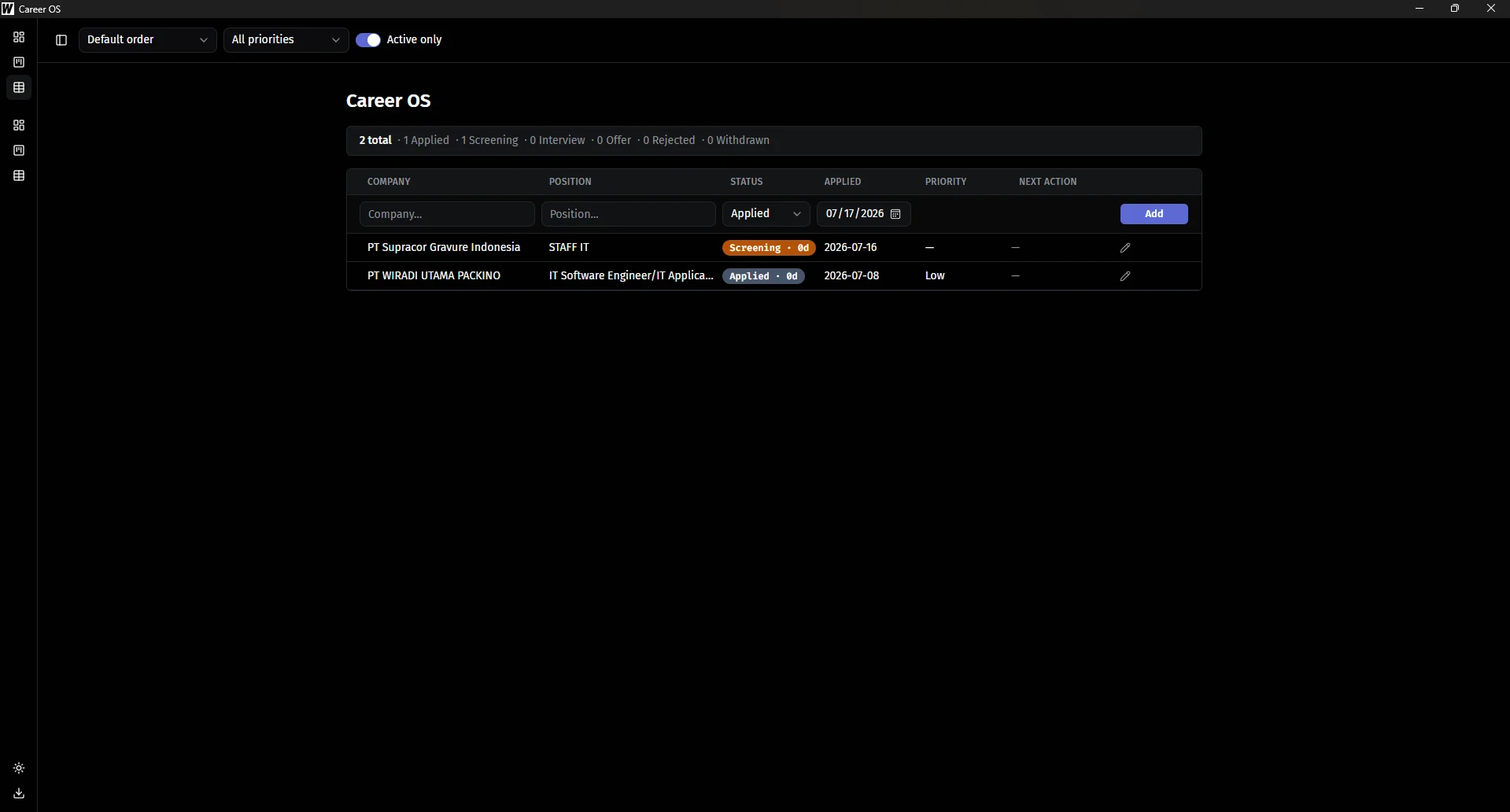
02 Job pipeline, Table view — inline quick-add row, aging badges, overdue indicators, no modal in sight
-
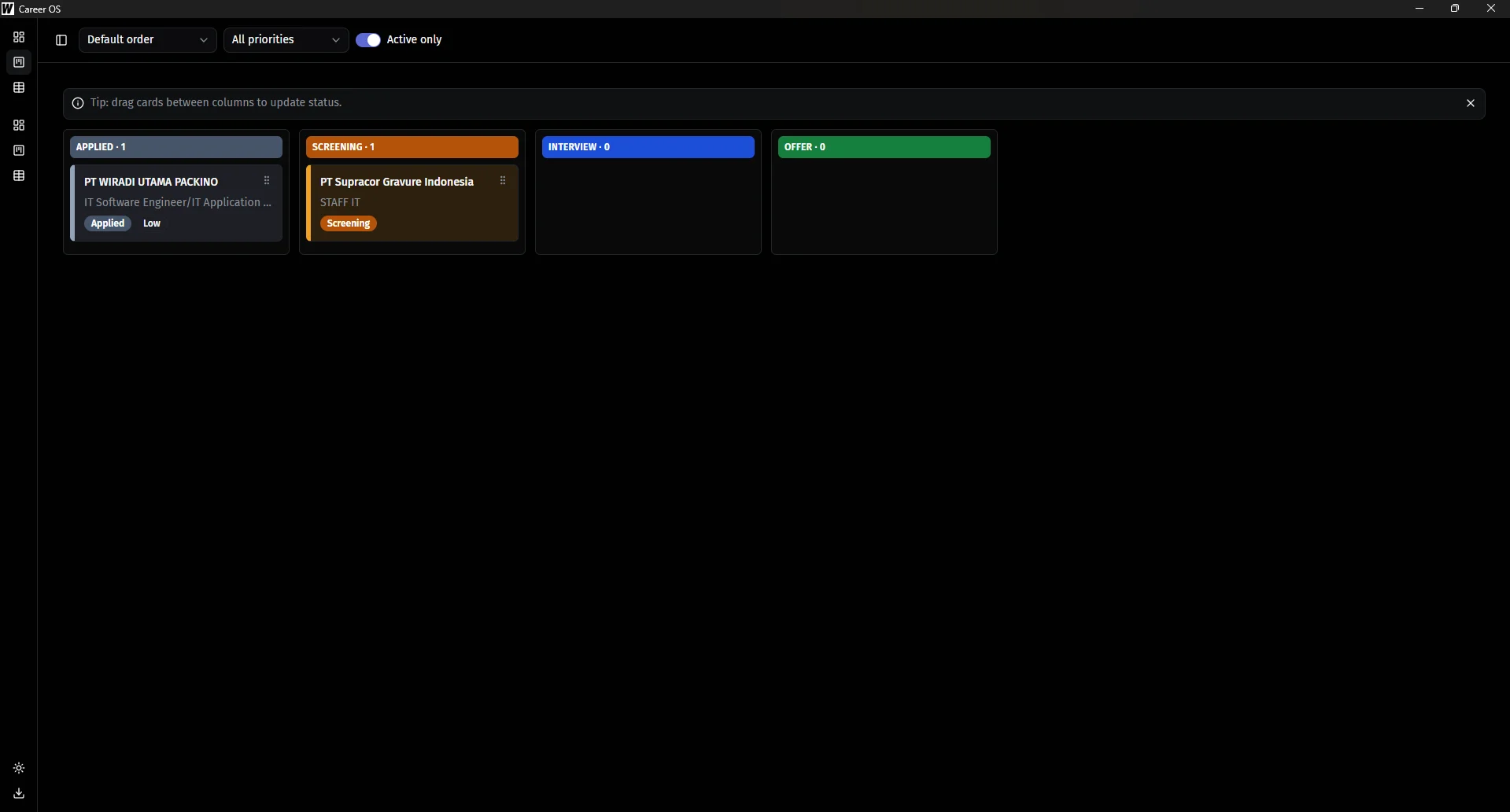
03 Job pipeline, Kanban board — from first application through interview rounds to an outcome, one drag at a time
-
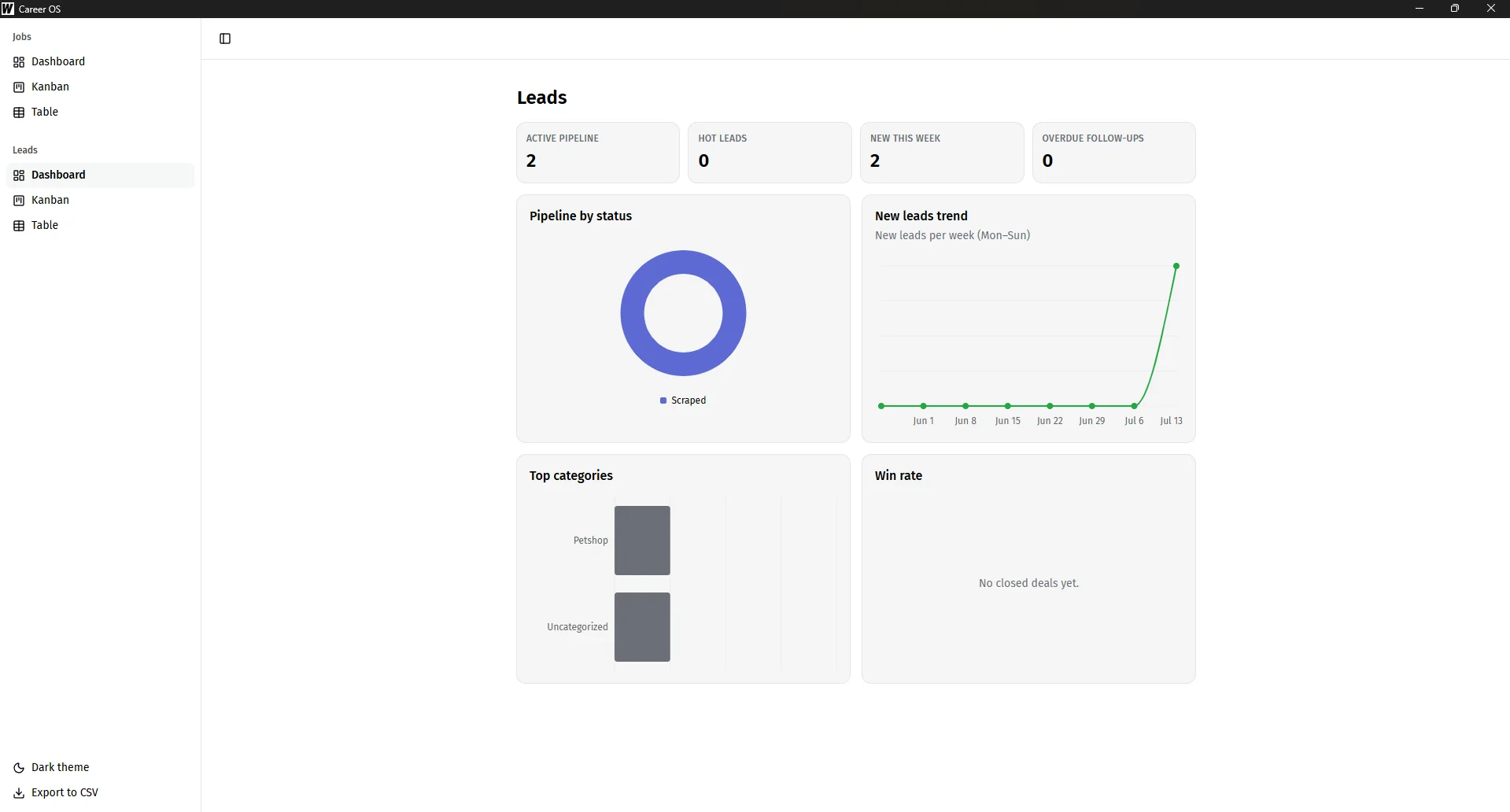
04 Lead pipeline, Dashboard — the same KPI-and-funnel layout, now reading Scraped through Won or Lost
-
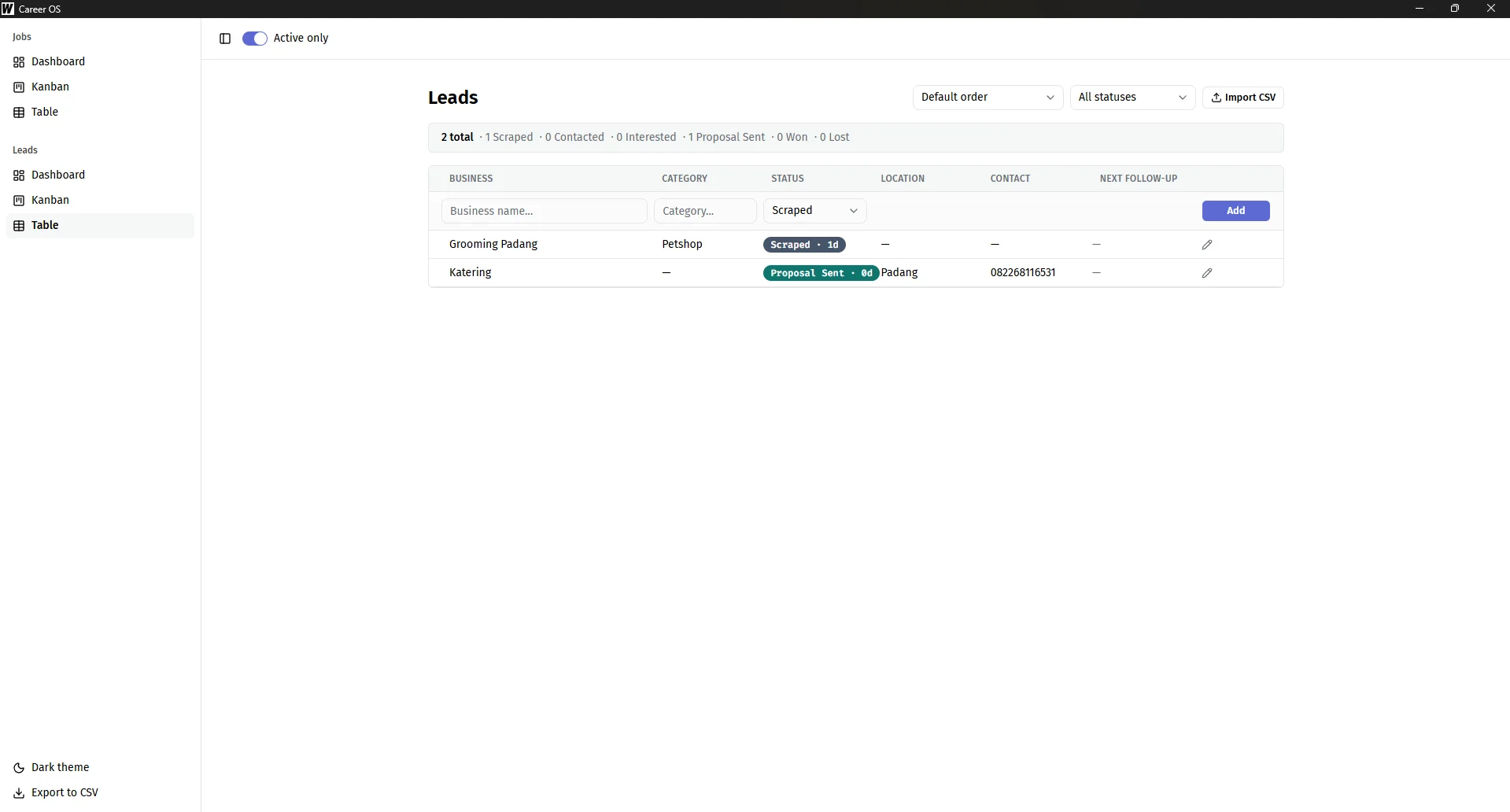
05 Lead pipeline, Table view — same quick-add row, same autocomplete, tracking outreach instead of applications
-
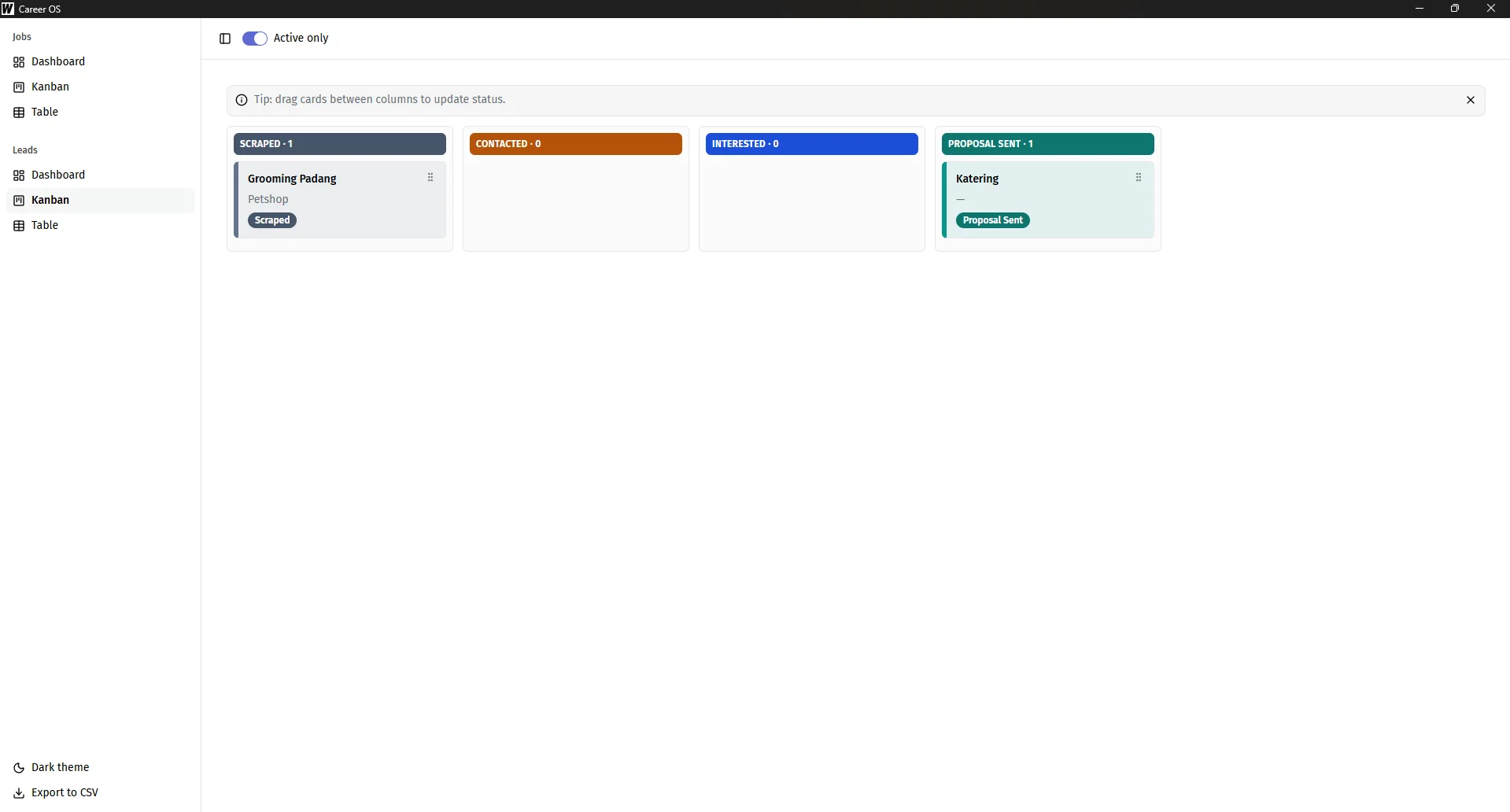
06 Lead pipeline, Kanban board — Scraped → Contacted → Interested → Proposal Sent → Won or Lost
Architecture decisions.
-
No REST layer, direct bindings
The frontend calls Go methods directly as async functions — no endpoints to design, no fetch calls, no serialization boundary to think about beyond what the desktop shell handles automatically.
-
A layered backend, on purpose
Each entity follows the same four-file shape: struct definitions, raw queries, validation and side effects, and the thin methods the frontend actually calls. Business rules — "company name is required," "auto-update the last-touched date on status change" — live apart from the query code, so one can change without touching the other.
-
Two pipelines kept deliberately separate
Job tracking and lead tracking are structurally almost identical — same table, Kanban, and dashboard shape, same CRUD lifecycle. Sharing that code looked obvious and was rejected on purpose: the two domains model inverted relationships — in one you're the applicant being evaluated, in the other you're the one doing the evaluating — and a structural resemblance alone isn't a reason to force a shared abstraction. The cost of that choice was real (a handful of layout fixes had to be reapplied by hand across both), and I'd pay it again.
-
Built for the dataset it will actually hold
Applying to up to thirty jobs a day with nothing pruned means the dataset was headed toward thousands of rows within months. The table renders through windowed virtualization, Kanban columns scroll independently at a capped height instead of growing the page, and an "active only" filter hides terminal-status items by default — applied identically to both pipelines.
-
One portable binary
A pure-Go SQLite driver keeps the whole app free of any C toolchain dependency, so the entire application — backend, frontend, and database engine — ships as a single file that just runs.
-
A design system pulled from a real reference, adapted honestly
The visual design went through a full reskin mid-build, landing on a single-accent, flat-surface look inspired by Linear's interface language — a natural fit for an app that's fundamentally a status pipeline. The six-color status system was kept as a deliberate, documented exception to that single-accent rule, not a silent violation of it.
What I learned.
-
Deliberate duplication can beat a premature abstraction
Two structurally similar domains don't automatically deserve a shared module — a seam only earns its keep when something actually varies between the two, not just when they look alike. Rejecting the shared abstraction twice, once at the time and once on a later review, held up.
-
Narrow scope shipped depth instead of breadth
The single-user model — no roles, no permissions, no multi-tenant plumbing — shed an entire dimension of work and put that time into pipeline depth and interface polish instead.
-
A calculated bet on a pre-1.0 tool
The desktop shell was pinned to a specific pre-1.0 release, not "latest" — a conscious trade-off. It buys one native binary with no bundled browser runtime and no REST layer to design, in exchange for accepting real API-stability risk on a tool that hasn't hit 1.0 yet. That bet held for the whole build.
-
Test where the risk actually lives
Testing investment went into the Go service layer — validation, cascade deletes, CSV formatting — running against a real embedded database rather than mocks, because that's where a bad write or an incorrect delete would actually cost something.
Building something this deliberate?
Every screen above is the actual app, used daily, not a demo. If you need software built with that same care for real day-to-day use — desktop, offline-first, or otherwise — I'm available for full-time and freelance engineering.